As photographers, we often pour all our energy into creating beautiful images, but when it comes to growing our business, relying solely on social media can be a bit of a gamble. Ever feel like you’re posting your heart out on Instagram, but the likes and follows aren’t turning into actual bookings? Yeah, you’re not alone. The good news? There’s a more reliable way to connect with potential clients and build a lasting relationship—email marketing.
If you’ve been putting off building your email list, now’s the time to dive in. Unlike social media, where algorithms decide who sees your posts, email marketing allows you to speak directly to people who want to hear from you. Think of it as your own personal VIP room—when someone gives you their email, they’re inviting you into their inbox, which is a much more personal space than their social media feed.
To grow your email list, you need a lead capture form, a way to collect email addresses from people visiting your website. We have all seen these (and probably entered our email into a fair share of them). They can look like anything from a “Save 10% off your order” to “Join a Free Challenge”. They are not only a great way to grow your email list, but they help you offer something of value to your audience.
So how do you choose the best lead capture form for you and your business? Let me help make it easy for you: Enter the Flodesk Spinner form – a super engaging, interactive element tool that entices your visitors to spin a virtual wheel for a chance to win something awesome (like a discount or freebie).
So, let’s break it down step-by-step to get your own spinner form set up and ready to capture those leads!
Step 1: Log into Flodesk
First things first, log in to your Flodesk account. If you’re not already using Flodesk, no worries—you can try it out for 50% off your first year HERE!
Once you’re logged in, head over to the Forms section in your dashboard. This is where the magic happens!

Step 2: Choose the Spinner Form
You’ll see a few different options for form types (Flodesk is really bringing the 🔥 when it comes to their forms). Go ahead and select the Spinner Form option. This type of form is perfect for photographers who want to engage visitors with something a little more interactive than a basic pop-up form. Your website visitors will be able to spin a virtual wheel to “win” something special from you—like a discount on a session or free print credit.
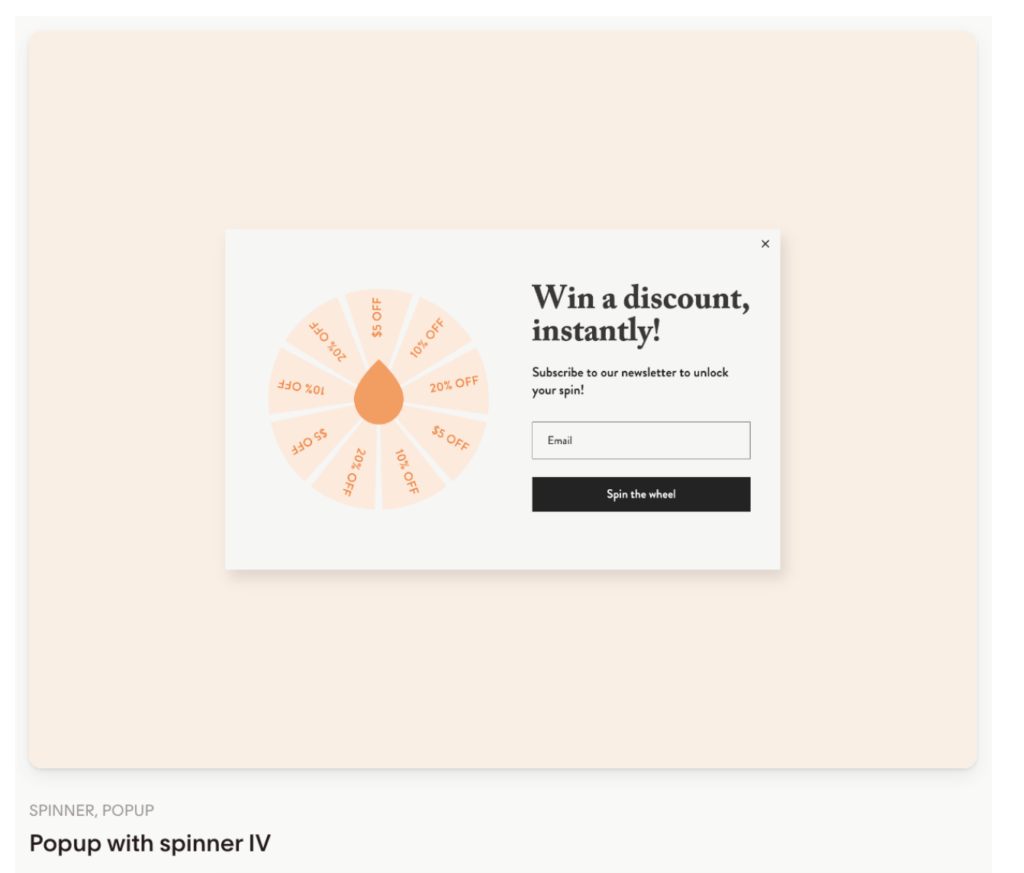
Step 3: Customize the Spinner
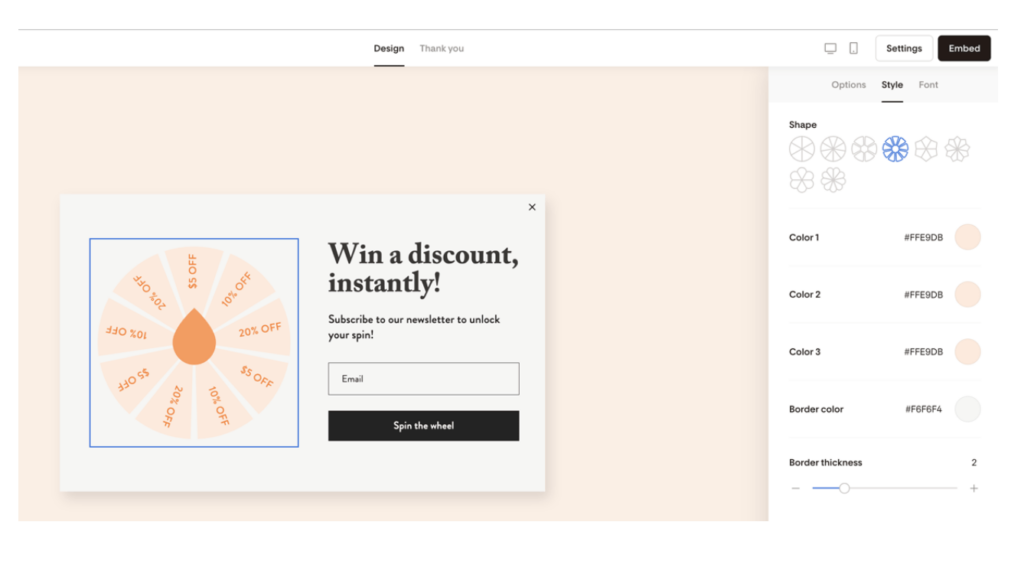
Now for the fun part—customizing your form to match your brand! Here’s what you can adjust:
- Colors: Make sure the spinner blends seamlessly with your website’s look and feel. For example, if your photography brand uses soft pastels or neutral tones, you can easily match those in the form settings. If your brand is more bold and colorful, then add a little flair with a unique spinner shape.
- Text: This is where you will let visitors know what they are seeing. Personalize the message with something short and to the point, maybe something like “Spin to win 15% off your next family session!” or “Take a spin for a chance to win a free mini session!” You can get creative with it!
- Prizes: Decide what you want your audience to “win.” You can offer discounts, free consultations, or a special offer like a free print from their next shoot.
Step 4: Set Display and Trigger Options
Now that your form looks good, it’s time to set when and where it will appear on your website.
- Change Segments: This is where you will control which segment of your Flodesk account new sign-ups will go in to. I like to create a separate segment for each opt-in form so I can quickly and easily see where my audience is coming from.
- Triggers: Choose when your form shows up—like after someone scrolls 30% of the page or spends a certain amount of time on your site. For example, you might want the form to appear right when someone’s looking at your portfolio page to encourage them to book a session or give them a little bit of time to scroll around first before offering them an incentive.

Step 5: Publish and Test
Before going live, make sure to test your form! Use Flodesk’s built-in preview tool to see how it will look on both desktop and mobile. Once everything looks good and works the way you want it to, click Embed.
You’ll get an embed code to add the form to your website. Don’t let this part overwhelm you. It’s a lot easier than you might think, and most website platforms have step-by-step tutorials to help you get it set up in no time.
Why Should Photographers Use a Spinner Form?
Flodesk Spinner forms aren’t just another tool to collect emails—they’re an opportunity to make your website more engaging and give visitors a fun reason to connect with you. Here’s why I think these forms are an absolute game-changer for photographers:
- More Fun, Less Pressure: Let’s be real, pop-ups can feel a little pushy. The spinner adds an element of fun that doesn’t feel as salesy.
- Better Engagement: People are more likely to provide their email when they think they’re getting something exclusive—especially if there’s an element of surprise like a spinner.
- Grow Your List with Ease: Building an email list is essential for photographers who want to nurture their leads and book more clients without relying solely on social media. By making the entry more fun and exciting you are more likely to get new subscribers.
Next Steps: Watch the Full Video Tutorial!
If you’re ready to dive deeper into the setup process and see exactly how I customized my own Flodesk Spinner form, I’ve got you covered. Check out my full YouTube tutorial, where I walk you through each step with real-time examples. Click the image below to watch the video and get your form set up in minutes ⬇️



biNoj5g9B8c
QdEHa2LcELS